

Overview
What if Slack understood your company language?
Slackronyms is an imagined feature that gives quick definitions of your company-specific language in sent messages.
Drawing from my own frustrations, whenever you onboard to a new team you're expected to quickly learn a new language. This project aims to simplify the onboarding process, and break down external teams siloed language.
Role
Sole designer
Timeline
2 weeks
2024
Tools
Figma
Cursorful
Jitter
1
New message

Clayton
5:10 PM
Thanks for checking out this case study!
Btw
do you have those
TPS
reports ready?
Go ahead, hover a "Slackronym"
Problem
Learning the company language is a struggle, even for veteran employees.
It's a waste of time and disrupts productivity when you have to hunt down definitions, or awkwardly interrupt a meeting to ask what it means. The problem is the longer an acronyms is used in the workplace, the less often you'll see it spelled out.
You end up having to reach out to somebody you think knows the term, you can't Google it since it's language exclusive to your company or industry, or you might look through your files in hopes that it's spelled out.
@Clayton, Can you add this to the CMS?
Uhhh, sure I'll get right on that!
Btw, what's a CMS? 🙏
Content Management System. Just make
sure you also update the DAM.
…I have another question ツ
Research
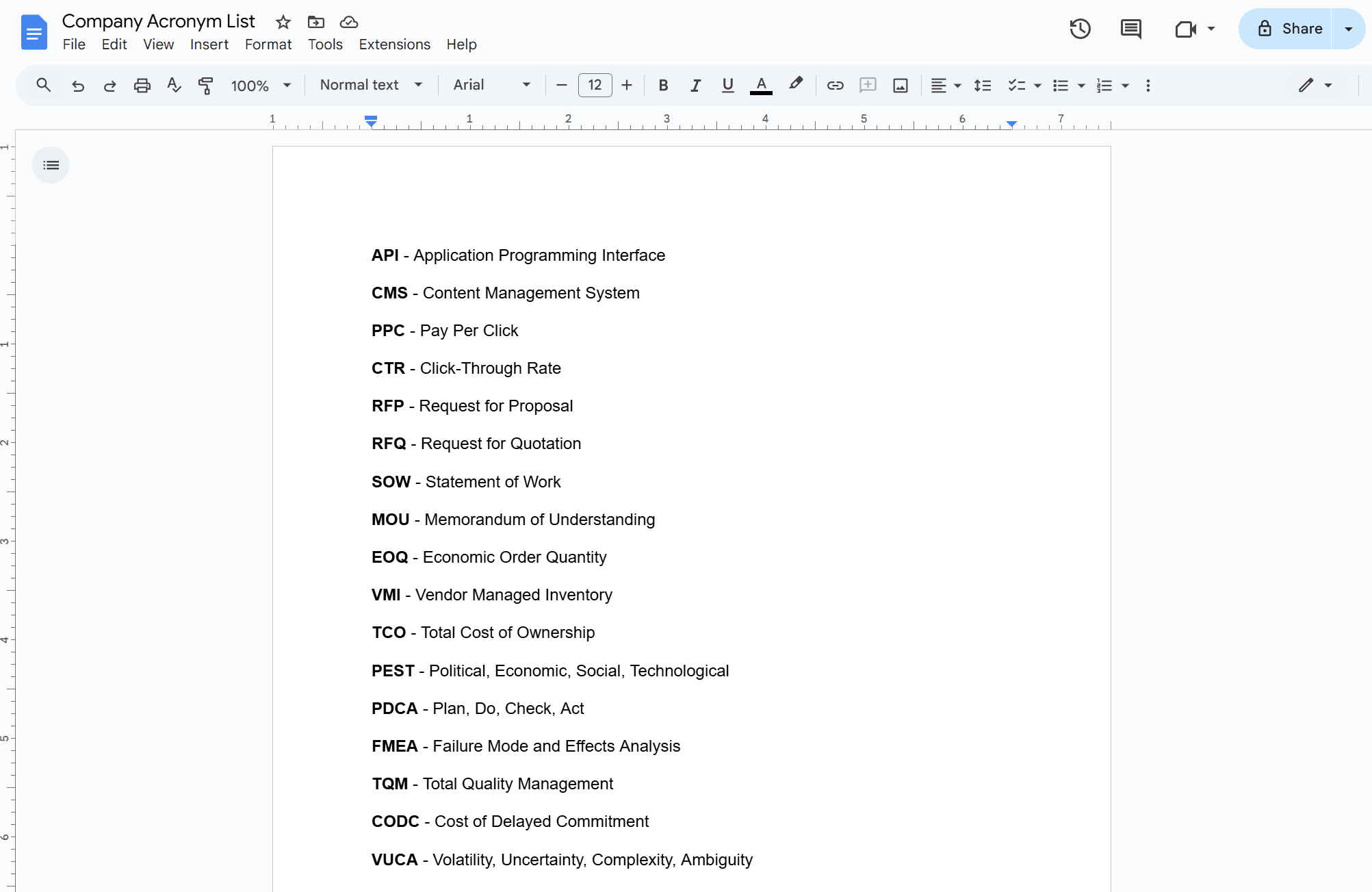
GitHub, Word, and Notion were common solutions, but still caused friction
Having a dictionary isn't enough, it needs to already be in my hands and opened to the right page (this is less of a subheading and more of a big takeaway)
A consistent theme emerged from interviews with colleagues at different companies: their organizations didn't want to build a dedicated internal tool, or add "another app" to employees' workflow, just to look up acronyms. The usual fallback was a makeshift word bank that was functional but clunky.
Custom solutions on GitHub had the best success, but were often built by the employees without regulation. The demand was there but needed structure.
INCLUDE SOME KIND OF FLOW OF HOW MY SOLUTION CAN FIX THIS
"In slack -> 1 hover away" "exit task->open the web page or program-> CTRL F-> close application.)
Search fatigue
Every single definition costs you effort. You have to stop what you're doing, open the glossary, Ctrl+F, type the acronym, and scan the results. Just to do it all over again.
Duplicate definitions
One acronym can mean three different things depending on the team, so these glossaries fill up with conflicting definitions and duplicate entries.
Difficult to scale
As the org grows, so does its language, new terms start slipping through the cracks, and old ones never get retired.
Lack of ownership
These glossaries are rarely company-managed, so there's no shared process for contributions, upkeep, and no one accountable to make the changes. Without consistent treatment, you lose trust in how accurate it is.
With 200k+ organizations already using Slack, what if we make a new feature for enterprise plans?
With this approach, organizations don't need to adopt to a new tool and Slack gets a unique competitive feature.
Design exploration
I started with mimicking the @mention behaviour
@Clayton
AFK
Drawing attention without being too loud.
I wanted to ease users into this feature with recognizable visuals so people would already know they could interact with it the same way they would with an @mention.
Why tooltips won't work - my explorations
Use this space to show some of the early explorations and why they don't work. For example, tooltips don't account for double definitions and cant be disabled since they have no actions.

Features
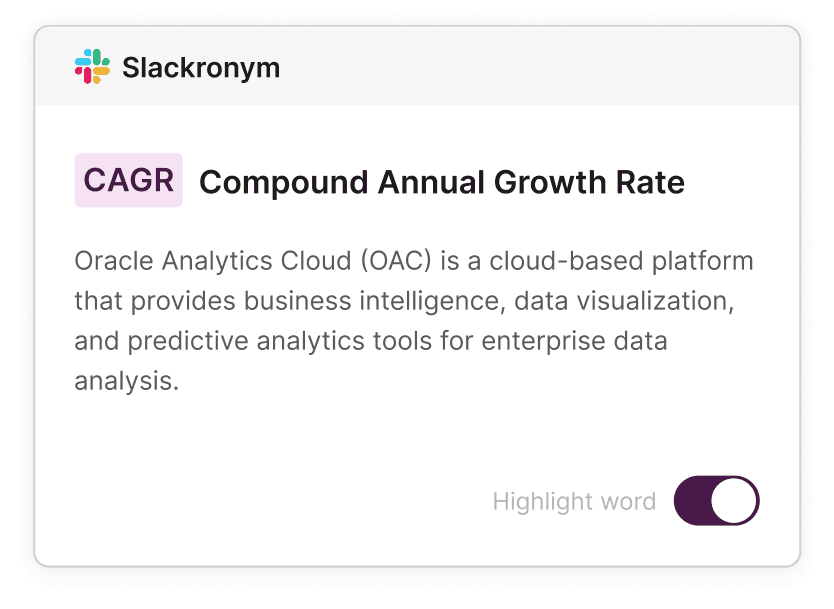
I explored interactions for mobile and methods to manage your Slackronyms
Toggle your preferences
You can disable specific unimportant words and view multiple definitions side by side for acronyms with more than one meaning. That way you get to decide when to take off the training wheels
Mobile
Bottom sheet > Cards
Lorem ipsum dolor sit amet, consectetur adipiscing elit, sed do eiusmod tempor incididunt ut labore.

Management
Manage outdated acronyms and approve new ones
What makes Slack so appealing is how you can customize your workspace. Slackronyms should feel the same way. With system-admin roles, you can approve new acronyms and enable/disable them across the org.
Further explorations
What happens when an acronym is used outside of Slack? Like a Zoom call?
Unlike word banks, employees already keep Slack open throughout the day, so I added quick search
I added 2 entry points, one through a menu option you can control that doubles as a way to manage acronyms - as well as shift+@ as a shortcut because when you hear an acronym being used, you need a fast way to search it so you can get back into the conversation.

Personal reflection time
Respect the current ecosystem
I had to use Slacks design system as best I could which did initially limit my creativity, but also taught me how to make the most of what you have to work with, finding new ways to use existing components.
Accidental activation is taxing
I have it set to hover, but clicking the field isn't normal behaviour.
Thinking through the admin-user relationship
Since these documents aren't officially being managed by the company, there is a lack of process and nobody bears responsibility for maintaining them. Without standards upfront, people will format entries differently
Up next
Teaching Slack your work lingo
I respect you for reading footers
clayding.eh@gmail.com
Clayding.eh@gmail.com
©2026